1. Ensure Flawless In-Store Execution Anywhere with TrueView's Offline Mode
Executing planograms perfectly is hard enough without having to battle mobile data limitations or poor internet connectivity. For field merchandisers, arriving at a remote store or a dead-zone aisle in the back of a large retailer often means losing access to critical implementation data. Waiting for planograms to load on spotty mobile data kills efficiency. Worse, taking compliance photos on a camera roll and writing down shelf issues manually means hours of tedious admin work later that evening to upload everything. This disconnect leads to delayed reporting, frustrated staff, and inaccurate store compliance tracking.
No Signal? Limited Data? No Problem.
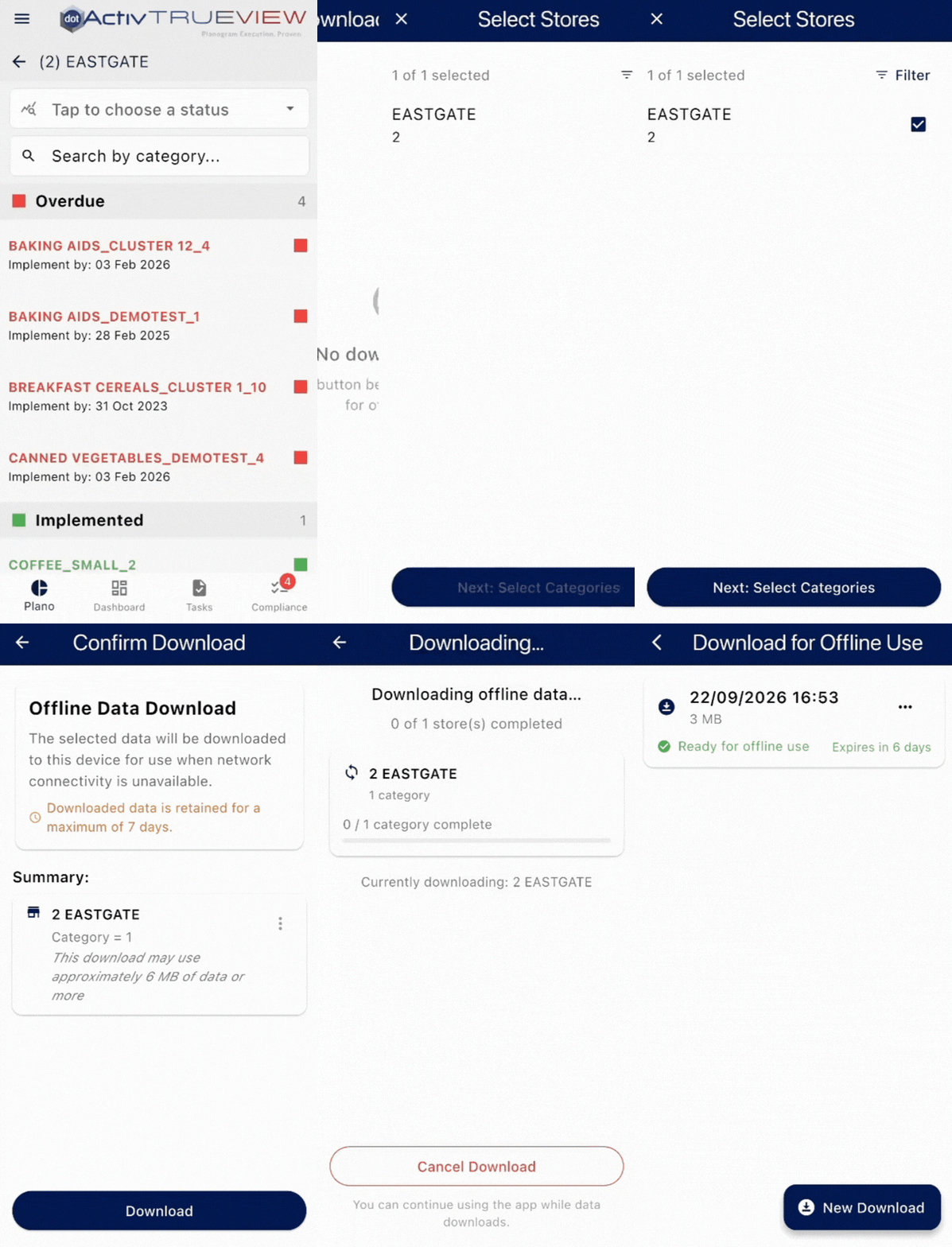
Say goodbye to connectivity roadblocks with TrueView’s Offline Mode. You can now download full category packages to your device ahead of time, so you can view planograms, capture compliance photos, and log shelf discrepancies offline. Once your device detects an internet connection, the app automatically syncs all your data back to headquarters.
How It Drives Efficiency
- Uninterrupted Workflow: Access vital PDF planograms and shelf reports instantly without relying on unpredictable in-store Wi-Fi.
- Automated Syncing: Capture segment-by-segment photos and log implementation issues offline; the system automatically uploads everything the moment your connectivity is restored.
- Targeted Efficiency: Select and download only the specific stores and categories you need for the week, conserving your mobile data and device storage.
- Enhanced Accuracy: Eliminate the risk of lost notes by reporting discrepancies and documenting compliance right at the shelf, exactly when you spot them.
How It Works in Practice
Imagine a field merchandiser tasked with implementing a new beverage planogram across several stores while knowing that he has limited mobile data availability; he uses Wi-Fi in the morning to download the necessary store packages in TrueView. Upon arriving at the store, he can instantly open the planogram, execute the new layout, and toggle the shelf report to check capacities. He snaps compliance photos of every segment, all while completely offline. Later, when he reconnects to a stable Wi-Fi network, he simply logs back into the app, and TrueView automatically submits all their proof of implementation to the server for processing.
Get Started with Offline Mobe
- Existing Customers: Make sure you have the latest version of the TrueView mobile app installed, and read our step-by-step PowerBase guide, TrueView Offline Mode: In-Store Execution Guide. Alternatively, book a demo with Customer Success.
- New to DotActiv?: Book a demo with a DotActiv Expert today to see how TrueView can bring speed and accuracy to your space planning process.
2. Streamline Assortment Changes with Cluster and Range Modelling in DotActiv
Updating store clusters used to mean drowning in complex spreadsheets. Planners had to export store lists, manually match proposed changes against live ranges in Excel, and cross their fingers that products would fit onto the shelf. This disconnected process wasted time and left huge room for error.
Model Assortment Impact Before Going Live
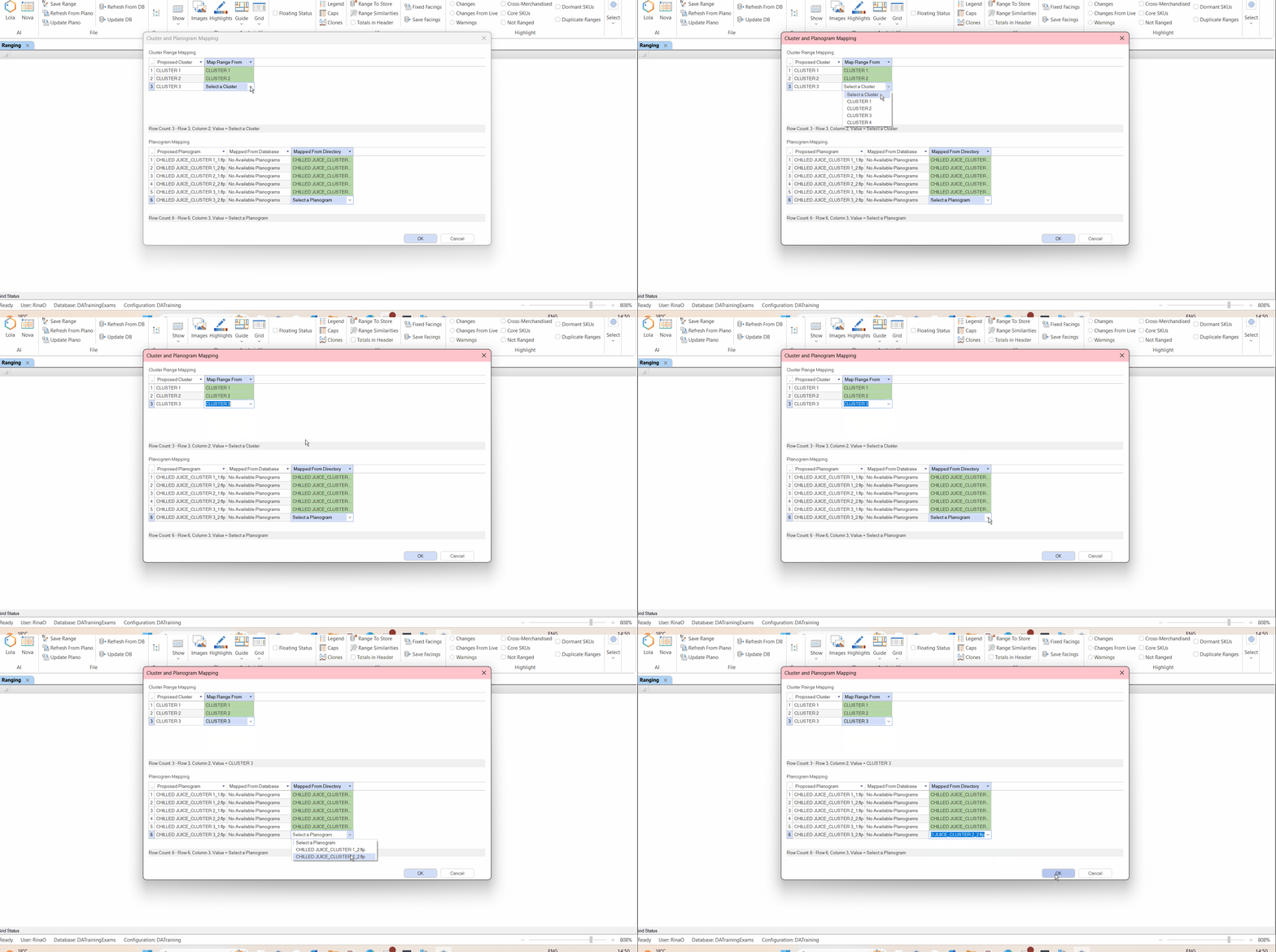
DotActiv’s Cluster and Range Modelling feature brings cluster optimisation and range maintenance together in one connected workspace. You can now test hypothetical cluster changes and see the exact impact on your product ranges and planograms before making anything official.
Welcome to this month’s DotActiv product roundup! We are excited to share powerful new updates designed to save you time and make space planning seamless from head office all the way to the store shelf. From modelling complex cluster changes without touching live data to executing flawless planogram audits completely offline, here is everything new in DotActiv this September.
How It Drives Efficiency
- Safe Scenario Planning: Model hypothetical store and range changes in a sandbox environment without touching your live database.
- Automated Store Mapping: Cut out manual spreadsheet work with smart logic that automatically maps new clusters to your existing live ranges.
- Visual Space Verification: Check whether added products physically fit baseline planograms before committing to range changes.
- Error-Proof Publishing: Avoid broken data links with built-in system safeguards that enforce the correct publishing sequence.
How It Works in Practice
Imagine a retail planner re-allocating 15 stores. Instead of spending days rebuilding range sheets manually in Excel, the planner loads the proposed cluster run directly inside DotActiv’s Ranging tab. The software automatically maps direct-match stores and prompts the user to assign mixed clusters. The planner sees which products fit on the baseline planograms and saves the hypothetical scenario. Once signed off, you push the updates live in sequence, saving hours of admin and preventing errors.
Get Started with Cluster & Range Modelling
- Existing Customers: Head to the Ranging tab in DotActiv, select New Cluster Model Range, and start testing your scenarios today, or read our step-by-step PowerBase guide, Cluster and Range Modelling: Evaluating How Revised Clustering Affects Current Assortments. Alternatively, book a demo with Customer Success.
- New to DotActiv?: Book a demo with a DotActiv Expert today to see how Cluster & Range Modelling can bring speed and accuracy to your space planning process.